
Realtime dashboard
Signal (RSSI, RSRP, RSRQ, SINR, band), traffic speedometer, connection status, and power source at a glance.
Monitor signal strength, lock LTE bands, and manage WiFi devices and SMS. Everything runs locally and privately, with no cloud and no account. Tested on the Orbit Star 2 B312-929.

Huawei Manager
—
—
Total downloads
—
Latest version
—
GitHub stars
20+
Supported modems
Built for Huawei LTE modems
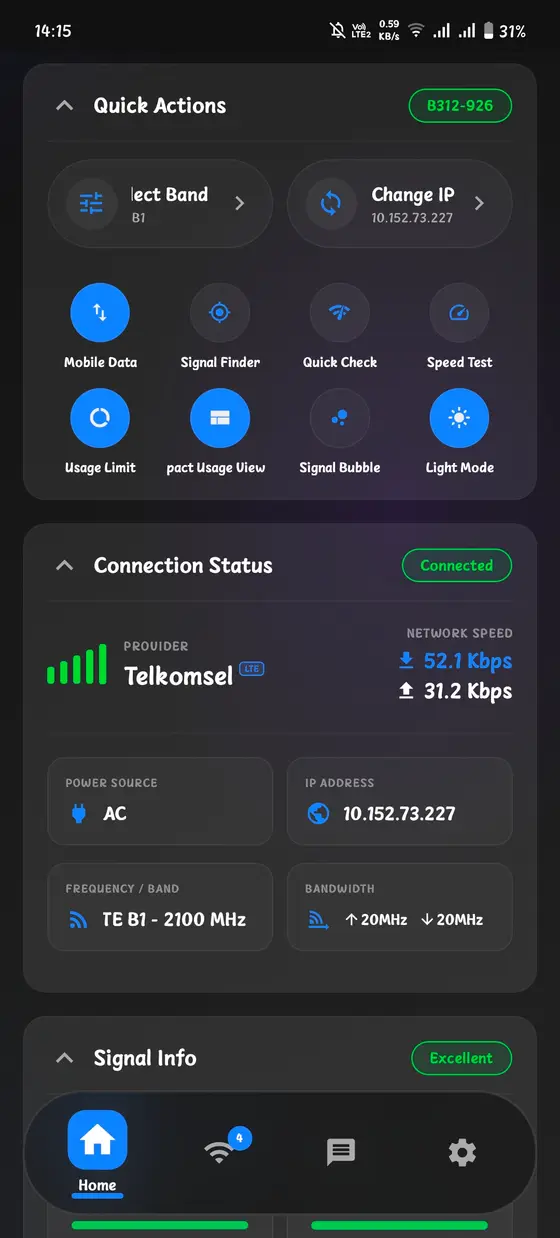
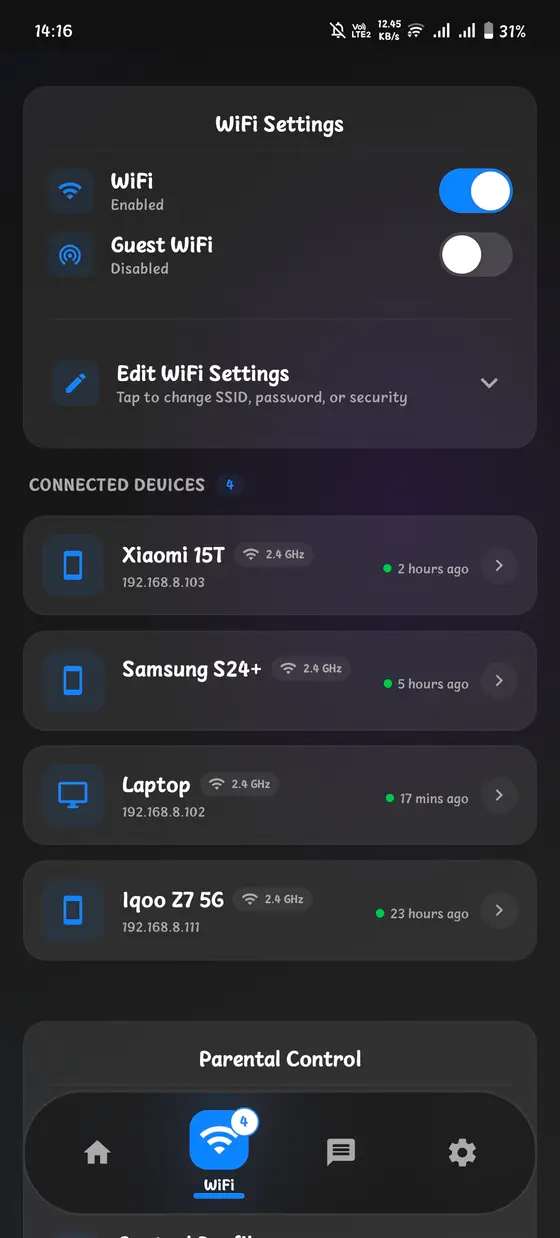
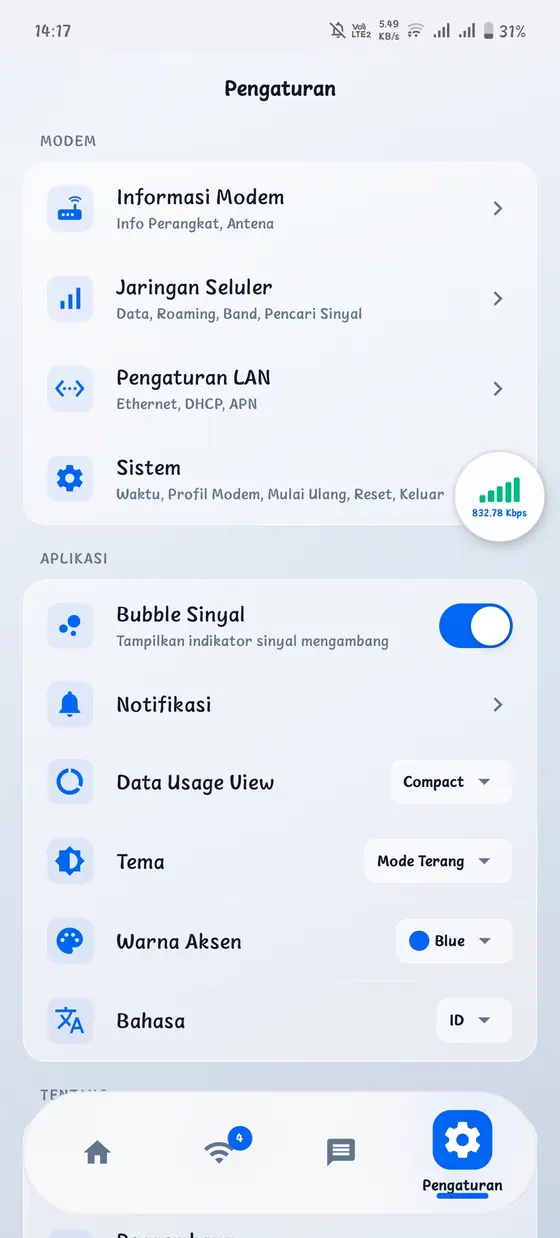
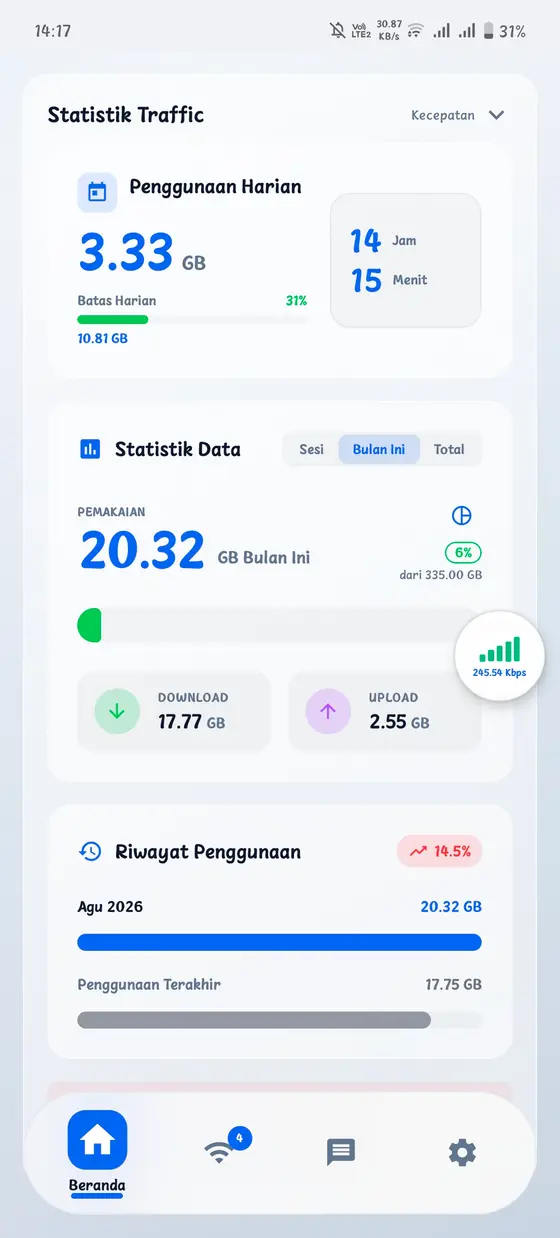
Real screenshots from the app, in light and dark themes, and in English and Indonesian.
What it does
The modem's built-in interface hides most of the device's capability. Huawei Manager exposes it all.
Signal (RSSI, RSRP, RSRQ, SINR, band), traffic speedometer, connection status, and power source at a glance.
Rotate or reposition the modem while watching live metrics to find the strongest spot.
Pick specific LTE bands, including 5G NR and carrier aggregation combos like B3+B1+N40.
List connected devices with vendor icons, kick or block devices, rename them, and see 2.4/5 GHz and lease time.
A second SSID with a time limit. Extend in 30-minute steps from the app.
Per-device schedules by day and time range. Cut internet at bedtime automatically.
Read, compose, send, and delete SMS, with unread count and search. When the modem supports it.
APN profiles, mobile data toggle, Ethernet, DHCP, and PPPoE configuration.
Signal and traffic status right on your home screen, refreshed hourly.
Push notifications when daily or monthly data crosses your threshold, when the IP changes, or when a new version lands.
An in-app internet speed test, plus quick actions for the settings you change most.
Log every API call and export a HAR file to report issues precisely.
The app talks directly to your modem over WiFi. No account, no data collection, no cloud.
How it works
If you can open the modem's admin page in a browser, this app can control it.
Join the modem's WiFi network, just like you do for the admin page.
Use the same username and password as the Web UI. The app auto-detects the modem IP (192.168.8.1).
Signal, bands, devices, SMS, and quota, all from one place.
Compatibility
Any device exposing the classic Huawei XML API on 192.168.8.1. Tested on the Orbit Star 2.
LTE Router
LTE Router
LTE Router
B312-929 · Orbit Star 2
LTE Router
LTE Router
LTE Router
Mobile WiFi
Mobile WiFi
Any Huawei LTE modem with the XML API
SMS and some settings depend on what the specific modem exposes.
Download
Three architectures, all free. No ads in core features.
Signed and verified via GitHub Actions
FAQ
No. The app talks to the modem's local API over your WiFi. No root, no cloud account.
Any Huawei LTE router that exposes the classic XML API: B310, B311, B312, B525, B535, B818, E5573, E5577 and more. The Orbit Star 2 (B312-929) is tested and popular in Indonesia.
No. Everything runs locally between your phone and the modem. There is no account and no analytics server.
Ads cover the push-notification server costs. Core features stay free and ad-free.
SMS support depends on the modem's firmware. The app hides the feature when the API does not expose it.
Not yet. The app is Android-only today, built with Expo, so iOS is possible in the future.
Feedback
Help make the app better. We read everything.
Or open a GitHub issue directly